Documentation
Defining a RestEndpoint
The following section will document the spec of a RestEndpoint.
For more completes examples please see the one in the repo
Availability of the values for both handlebars templates and rhai scripts
The following values are populated in the order of the documented flow:

inputinitprereadwritepost
Which mean write is empty when computing the reads instructions. But read is fully populated when running the writes.
All these keys will have sub-keys based on the names of their definition.
input from Secret and ConfigMap
The following definition:
spec:
  inputs:
  - name: mySecret
    secretRef:
      name: secret-name
Will populate the value input.mySecret with the whole definition of the secret secret-name. Which mean input.mySecret.metadata.name is a string with the value secret-name if the said secret do exist.
Please note that the object is provided as-is. So the data from a secret will be base64 encoded. The base64_decode helper for handlebars and the same rhai method are there to accomodate you.
If your definition can accomodate the absence of the Secret (or ConfigMap), use the optional: true key as bellow :
spec:
  inputs:
  - name: myOptConfig
    configMapRef:
      optional: true
      name: secret-name
Any referenced Secret or ConfigMap missing without that optional: true key will stop the process. A kubernetes event will be produced, and a conditions in the status will explain the missing piece(s).
Reacting to a change of an input: watchInputs
By default kuberest does not watch the Secrets and ConfigMaps used as inputs: a change is reflected on the next verification loop (checkFrequency, 1h by default). Set watchInputs: true and the RestEndPoint is reconciled as soon as one of its input Secrets or ConfigMaps is created, changed or deleted:
spec:
  watchInputs: true
  checkFrequency: 3600   # now only a slow drift check
  inputs:
  - name: src
    secretRef:
      name: app-secret
A few things to know:
- It is opt-in, per RestEndPoint (default:
false, nothing changes without it). Only the Secrets and ConfigMaps listed ininputsare followed, in their own namespace unless anamespaceis given and cross-namespace access is allowed (see multi-tenancy). - The controller watches the metadata of the Secrets and ConfigMaps only, never their content. Changes happening while a reconcile is running are grouped into a single next one. Two inputs changed one after the other may give a first reconcile seeing only the first change, followed by a second one.
- Changes made by kuberest itself (the Secrets and ConfigMaps written by
outputs) never wake anybody up, otherwise an output used as an input would loop. If a RestEndPoint B uses the output of a RestEndPoint A as an input, B is not woken up by A’s writes and waits for itscheckFrequency. - On startup, the controller reconciles once every RestEndPoint with
watchInputs, so changes made while it was down are not lost. - If a reconcile triggered by an input fails, it is tried again (after 5 minutes at most) without waiting for
checkFrequency. - Rotating tokens (such as a ServiceAccount token Secret) change often: do not use them as
inputsof a RestEndPoint withwatchInputs, it would reconcile at each rotation.
Without watchInputs, using kuberest as a secret-copier is a bad abuse: the dedicated operators doing this use watch, so the changes are reflected immediately. With it, the Vault example (examples/vault/watch-inputs.yaml) follows its source Secret the same way.
input from rendered handlebars templates
This is an helper to help you save a value to be reused multiple time later in the RestEndpoint definition and be sure the value will be the same.
spec:
  inputs:
  - name: uuid
    handleBarsRender: "{{ uuid_new_v7 }}"
will put a generated uuid in input.uuid.
Going further, JSON object are also supported:
spec:
  inputs:
  - name: config
    handleBarsRender: |-
      {{#to_json format="yaml"}}
      merge_method: ff
      issues_enabled: false
      {{/to_json}}
Set input.config.merge_method to "ff".
input from a Password Generator
:warn: While the kuberest do provide the feature, it is probably advised to use a dedicated operator like kubernetes-secret-generator if you need a lot of them and maintain them. Use with caution.
This feature is mainly provided to set strong default password for technical users within the manipulated endpoint. Do not overuse this ;)
spec:
  inputs:
  - name: password
    passwordGenerator:
      length: 32
      weightAlphas:  60
      weightNumbers: 20
      weightSymbols: 20
Will set a generated password with default configuration for input.password. The following would have defined the same thing.
spec:
  inputs:
  - name: password
    passwordGenerator: {}
The default configuration create a 32 charaters long password with 60% of letters (capitalized or otherwise) 20% of numbers and 20% of symbols.
Configuring the REST client
spec:
  client:
    baseurl: "https://gitlab.com/api/v4"
Is a strict minimum for any RestEndpoint definition and set the rest client base url to use Gitlab REST endpoints.
Authentication
Since no REST endpoint come without any form of authentication, a more complete definition would be:
spec:
  inputs:
  - name: token
    secretRef:
      name: my-personal-gitlab-token
  client:
    baseurl: "https://gitlab.com/api/v4"
    headers:
      Authorization: "Bearer {{ base64_decode input.token.data.gitlab_token }}"
Basic authentication is also possible:
spec:
  inputs:
  - name: admin
    secretRef:
      name: gitea-admin-user
  client:
    baseurl: "https://gitea.your-company.com/api/v1"
    headers:
      Authorization: "{{ header_basic (base64_decode input.admin.data.username) (base64_decode input.admin.data.password) }}"
Others headers
You can define any other needed headers as you please. The following headers are already set for you, but you can overwrite them (with all the implied consequenses: kuberest will still expect json data and will still send the http body as json encoded)
spec:
  client:
    headers:
      Content-Type: "application/json; charset=utf-8"
      Accept: "application/json"
Further client configuration
Here are the other availables options for the client and their default value:
spec:
  client:
    keyName: id
    teardown: true
    createMethod: Post
    readMethod: Get
    updateMethod: Patch
    deleteMethod: Delete
    childrenNoSubKey: false
    keyIsPath: false
| key | default | description |
|---|---|---|
| keyName | id | the key in the returned object that identify the object |
| teardown | true | Should the created objects (writes section) be deleted when then RestEndpoint is deleted |
| createMethod | Post |
Creating the objects with which HTTP primitive. Available values: Post, Put. |
| readMethod | Get |
Reading the objects with which HTTP primitive. Available values: Get and Post (see reading with Post). |
| updateMethod | Patch |
Updating the objects with which HTTP primitive. Available values: Put, Patch, Post and None (never update). |
| deleteMethod | Delete |
Deleting the objects with which HTTP primitive. |
| childrenNoSubKey | false | If true, updates and deletes use the same path as create and pass the primary key inside the request body instead of appending it to the URL. Useful for APIs that do not follow the {collection}/{id} pattern. |
| keyIsPath | false | If true, the key returned by the API is a full path (an href) used as is, relative to the baseurl, for updates, deletes and tasks. See APIs keyed by href. |
keyName, teardown, the methods, childrenNoSubKey and keyIsPath can be overwritten per “write group” if needed.
Defines read from HTTP Get
All reads will use the client definition
spec:
  client:
    baseurl: "https://gitlab.com/api/v4"
  reads:
  - name: projects
    path: "users/123456"
    items:
    - name: list
      key: "projects"
Would define read.projects.list from the result of the following command: curl https://gitlab.com/api/v4/users/123456/projects.
Which mean, the URL used is defined by <client.baseurl>/<read_group.name>/<item.key>.
You can defined as many read groups and item as needed.
Hint: item key can be empty, so you can make this a little less awkward:
spec:
  reads:
  - name: seb
    path: "users/123456/projects"
    items: [{"name": "list", "key": ""}]
  - name: paul
    path: "users/654321/projects"
    items: [{"name": "list", "key": ""}]
Which would set read.seb.list and read.paul.list. Alternatively, you can:
spec:
  reads:
  - name: projects
    path: "users"
    items:
    - name: seb
      key: 123456/projects
    - name: paul
      key: 654321/projects
Which would set read.projects.seb and read.projects.paul with the same value as in the previous example.
Reading with Post
Some APIs hand out a value through a POST that creates nothing durable (a token, a computed result). Such a value is a read, not a write: use read_method: Post on the read group (or readMethod: Post on the client). Mind the spelling: the keys of a read group and of its items are in snake_case (read_method, json_query), unlike the client and the write groups.
spec:
  client:
    baseurl: http://vault:8200/v1
  reads:
  - name: tools
    path: sys/tools/random
    read_method: Post
    items:
    - name: random
      key: "16"
      json_query: "$.data.random_bytes"
This sends a POST with an empty body to <baseurl>/sys/tools/random/16; the answer is handled exactly as a Get (json_query, optional, read.<group>.<item>).
Postis forreadsonly. Awritesgroup always checks the existence of an object with aGet, whateverreadMethodsays.
Create REST objects and get their definitions set in write
The URL construction for writes work exactly the same as for reads. The actual key for each created object will be stored and kept to reuse on updates.
spec:
  client:
    baseurl: "https://gitea.your-company.com/api/v1"
  writes:
  - name: application
    path: user/applications/oauth2
    items:
    - name: woodpecker
      values: |-
        confidential_client: true
        name: woodpecker
        redirect_uris:
        - "https://woodpecker.your-company.com/authorize"
So the initial call here would make a POST to “https://gitea.your-company.com/api/v1/user/applications/oauth2” while the later scheduled updates will do a PUT to “https://gitea.your-company.com/api/v1/user/applications/oauth2/<id>” where <id> is the obtained “id” on the initial POST response.
values is an HandleBars template that return a YAML formated object.
Further writes configuration
You can overwrite the behaviour of the controller for a write group using:
spec:
  writes:
  - name: application
    keyName: id
    keyUseSlash: false
    teardown: true
    createMethod: Post
    readMethod: Get
    updateMethod: Patch
    updatePath: ""
    childrenNoSubKey: false
| key | default | description |
|---|---|---|
| keyName | id | the key in the returned object that identify the object |
| keyUseSlash | false | Should the url of an update/delete end with a slash (<path>/<key>/) |
| teardown | true | Should the created objects (writes section) be deleted when then RestEndpoint is deleted |
| createMethod | Post |
Post or Put |
| readMethod | Get |
Verb used to check that an object exists. Post is ignored here (Get is used) |
| updateMethod | Patch |
Updating the objects with which HTTP primitive. Available values: Put, Patch, Post and None (never update). |
| updatePath | the group path |
Path used for the updates and deletes when it differs from the creation path |
| childrenNoSubKey | false | If true, updates and deletes use the same path as create and pass the primary key inside the request body instead of appending it to the URL. Overrides the client-level setting. |
| keyIsPath | client value or false | The key returned by the API is a full path used as is (see APIs keyed by href) |
| adopt | false | Default for the items, see adopting an existing object |
| diff | None |
Default for the items, see diff before update |
| async | none | The API answers writes with a task to follow, see asynchronous writes |
Options of a single item:
| key | default | description |
|---|---|---|
| teardown | group value | Delete this object when the RestEndpoint is deleted |
| key | none | Static key |
| readPath | none | When the write answers without a usable body, the object is read back from this path |
| readJsonQuery | none | JSON path applied on the answer of readPath |
| adopt | group value | Adopt an object that already exists |
| diff | group value | Compare before updating |
| valuesQuery, readValuesQuery | none | JSON paths narrowing both sides of the comparison |
The keys of the objects created by writes are recorded as soon as they are created: if the post script (or any later step) fails, the next reconcile updates them instead of creating them again.
Static key: an idempotent upsert
When the API addresses an object by a name you know in advance (Vault KV, many PUT /things/<name> APIs), give the item a key. The object lives at <path>/<key>: create, update and delete all use that URL and no key is read from the answers (an empty 204 answer is fine).
spec:
  writes:
  - name: kv
    path: secret/data
    createMethod: Put
    updateMethod: Put
    items:
    - name: app
      key: app
      values: |
        data:
          password: s3cr3t
Diff before update
Without diff, an object is updated at every reconcile. Some APIs create a new revision on each write (Vault KV v2 versions, for instance). With diff, the object is read first and only updated when it differs from the desired values:
Subset: every key of the desired values must match; extra keys on the remote side are ignored.Exact: extra keys on the remote side are a difference too.
The comparison is tolerant: a desired null matches a missing key and 1 equals 1.0. Arrays and scalars are compared strictly. A remote object that cannot be read (404 or an empty answer) is considered absent.
When the answer of a read is not shaped like the payload of a write, narrow both sides with valuesQuery (applied on the rendered values) and readValuesQuery (applied on the observed answer, default: the readJsonQuery result). A query that matches nothing compares the whole value, so the object is updated.
    diff: Subset
    items:
    - name: app
      key: app
      valuesQuery: "$.data"            # the payload is {data: {...}}
      readValuesQuery: "$.data.data"   # a KV v2 read is {data: {data: {...}, metadata: {...}}}
Adopting an existing object
With adopt: true, an object that already exists (created by hand, or by a run whose state was lost) is taken over instead of failing with 409 or 422. The object is searched through readPath, or at <path>/<key> with a static key, and its key is recorded. An existing object that answers with an empty body is seen as absent and is created.
APIs keyed by href
Some APIs (Pulp, for instance) identify an object by a full path returned in the answer (pulp_href). With keyIsPath: true and keyName: pulp_href, that value is used as is, relative to the baseurl, for updates, deletes and tasks.
Asynchronous writes
When the API answers a create or an update with a task to follow:
spec:
  writes:
  - name: remotes
    path: pulp/api/v3/remotes/file/file/
    keyName: pulp_href
    keyIsPath: true
    async:
      taskPath: "$.task"
      statePath: "$.state"
      done: [completed]
      failed: [failed, canceled]
      resultPath: "$.created_resources[0]"
      timeoutSeconds: 600
| key | description |
|---|---|
| taskPath | JSON path of the task reference in the answer of a write |
| statePath | JSON path of the state in the task object |
| done / failed | States meaning the task finished successfully / failed |
| resultPath | JSON path, in a finished task, of the reference of the created object. Without it the object is found back through readPath |
| timeoutSeconds | A task still running after that delay is considered failed (default: 600) |
While a task runs, the RestEndpoint carries a WritePending condition and is checked again soon. Only creates and updates are followed: a DELETE answering with a task is considered done.
Using childrenNoSubKey for non-REST-compliant APIs
Some APIs do not follow the standard {collection}/{id} URL pattern. Instead, every operation (create, update, delete) targets the same endpoint and the object identifier is passed in the request body.
For example, if your API expects:
- Create:
POST /itemswith{name: "foo"} - Update:
PUT /itemswith{id: 42, name: "foo"}(notPUT /items/42) - Delete:
DELETE /itemswith{id: 42}(notDELETE /items/42)
Then the following configuration handles it:
spec:
  writes:
  - name: mygroup
    path: items
    childrenNoSubKey: true
    items:
    - name: myobject
      values: |-
        name: foo
With childrenNoSubKey: true, kuberest will:
- On update: call
PUT /itemswith{id: <stored_key>, name: "foo"}(key merged into payload) - On delete: call
DELETE /itemswith{id: <stored_key>}(key as payload, same path as create)
Saving the results with outputs
Saving the results is straightforward:
spec:
  outputs:
  - kind: ConfigMap
    metadata:
      name: set-all-projects-merge-method
    data:
      result.yaml: |-
        ---
        {{ json_to_str post.results format="yaml" }}
Availables kind: ConfigMap and Secret.
Availables metedata fields: name, labels, annotations and namespace (if multi-tenancy is disabled).
Data values are also handlebars templates.
note: Secret data is passed to the cluster as
stringData, so the cluster will base64 encode the secret values for us. No need to mess with base64_encode here.
spec:
  outputs:
  - kind: Secret
    metadata:
      name: woodpecker-gitea-openid
    data:
      WOODPECKER_GITEA_CLIENT: "{{ write.application.woodpecker.client_id }}"
      WOODPECKER_GITEA_SECRET: "{{ write.application.woodpecker.client_secret }}"
Case study: HashiCorp Vault
Vault is supported with token authentication: the token only has to be in the X-Vault-Token header, whichever way it was obtained. Complete examples are in examples/vault and run in the CI against a Vault in dev mode.
spec:
  inputs:
  - name: token
    secretRef:
      name: vault-token
  client:
    baseurl: http://vault:8200/v1
    headers:
      X-Vault-Token: '{{ base64_decode input.token.data.token }}'
Reading a KV v2 secret
A KV v2 read is shaped {data: {data: {...}, metadata: {...}}}: json_query narrows it down to the secret.
spec:
  reads:
  - name: kv
    path: secret/data
    items:
    - name: app
      key: from-vault
      json_query: "$.data.data"
  outputs:
  - kind: Secret
    metadata:
      name: from-vault
    data:
      password: "{{ read.kv.app.password }}"
Writing a KV v2 secret
Every write to KV v2 creates a new version, even with identical data, and a write answers 200 with metadata or 204 with an empty body. A static key plus diff: Subset keeps a single version as long as nothing changes, and corrects a manual change made in Vault at the next reconcile:
spec:
  writes:
  - name: kv
    path: secret/data
    createMethod: Put
    updateMethod: Put
    diff: Subset
    items:
    - name: app
      key: app
      valuesQuery: "$.data"
      readValuesQuery: "$.data.data"
      values: |
        data:
        {{#each input.src.data}}
          {{@key}}: {{{ json_to_str (base64_decode this) }}}
        {{/each}}
On teardown the secret is deleted (DELETE secret/data/app, which deletes the latest version). To destroy all the versions, use secret/metadata in a teardown script.
Values handed out by a POST
sys/tools/random/<bytes> answers a POST with random bytes and stores nothing: read it with read_method: Post (see reading with Post).
Available helpers for handlebars templates
From dependencies
kuberest use the handlebars_misc_helpers crate which provide a lot of others helpers see the documentation on that page for the complete list.
From this package
| Helper | Arguments | Description | Example |
|---|---|---|---|
| base64_decode | base64_encoded_string | Decode a base64 encode string (usefull for Secret values) | base64_decode input.secret.data.some_key |
| base64_encode | string_to_encode | Encode a string/buffer with the base64 encoding | base64_encode "username:password" |
| gen_password | length | Generate a password if specified length | gen_password 32 |
| gen_password_alphanum | length | Generate a password if specified length without any specials characters | gen_password_alphanum 8 |
| header_basic | username, password | Generate a “Basic encoded_auth” value to set with a “Authorization” header | header_basic (base64_decode input.secret.data.username) (base64_decode input.secret.data.password) |
| argon_hash | password | Hash a password using the Argon2 algorithm | argon_hash (base64_decode input.secret.data.password) |
| bcrypt_hash | password | Hash a password using the BCrypt algorithm | bcrypt_hash (base64_decode input.secret.data.password) |
rhai scripts
Rhai is a memory-safe scripting engine. It is a very pleasant language to play with. Have a look at their examples to learn the language capabilities.
The only reason why this ability exist is: many of the apps we love have configuration endpoints that do not comply with REST (Grafana, SonarQube to name a few). Provoding this ability come with risk of abuses. Dont, for your own cluster safety ;)
All rhai scripts (init/pre/post/teardown) are expected to return a Map, so the most minimal script is:
#{}
This is an empty Map in the rhai language. Failing to return a Map will stop the process. Errors are documented in the conditions of the RestEndpoint.
Pitfall: a reserved word of the language used as a key of a map literal (
#{ private: true }) fails withErrorParsing(PropertyExpected, ...). Quote the key:#{ "private": true }.
pre script usage
Templating/Preparing data for later stage(s):
fn genValues(name) {
  #{
    name: name,
    other: "properties",
    to: #{
      configure: "your",
      way: name+"-test"
    }
  }
}
#{
  pierre: genValues("pierre"),
  paul: genValues("paul"),
  jacques: genValues("jacques"),
}
post script usage
Some api endpoints are not REST friendly, use your scripting skillz for these.
warning You’re on your own. Using this mean kuberest wont handle the teardown process for you. Before using this, write your teardown script. Or you’ll leave garbage behind you.
teardown script usage
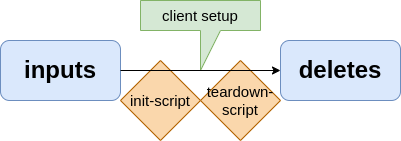
It’s meant to undo your changes in the post script.
If your writes use the pre variables in the templates, then the teardown needs to provides the sames values. YAML allow to duplicate strings, use it:
spec:
  pre: &genValues |-
    #{
      some: "values"
    }
  teardown: *genValues
Available methods for rhai scripts
| Method | Arguments | Return | Description | Example |
|---|---|---|---|---|
| gen_password | length (number) | string | Generate a password of requested length | let passwd = gen_password(32); |
| gen_password_alphanum | length (number) | string | Generate a password of requested length without any special characters | let weak_passwd = gen_password_alphanum(8); |
| base64_decode | base64_encoded_data (string) | string | Decode a base64 encode string (usefull for Secret values) | letdecoded = base64_decode(input.secret.data.some_key); |
| base64_encode | string_to_encode | string | Encode a string/buffer with the base64 encoding | let encoded = base64_encode("username:password"); |
| json_encode | data (any) | string | Convert any data to their JSON representation string | let encoded = json_encode(#{test: "value"}); |
| json_decode | encoded_data (string) | any | convert any json formated data to their rhai object/array/… conterpart | let data = json_decode("{\\"name\\":\\"paul\\"}"); |
| yaml_encode | data (any) | string | Convert any data to their YAML representation string | let encoded = yaml_encode(#{test: "value"}); |
| yaml_decode | encoded_data (string) | any | convert any YAML formated data to their rhai object/array/… conterpart | let data = yaml_decode("name: paul"); |
| yaml_decode_multi | encoded_data (string) | array | convert a multi-document yaml string into an array of the corresponding object/array/… | let data = yaml_decode_multi("name: paul"); |
| bcrypt_hash | password | string | hash a clear-text password using the bcrypt algorithm | let hash = bcrypt_hash("my_secret_password"); |
| new_argon().hash | password | string | hash a clear-text password using the Argon2 algorithm | let hasher = new_argon();let hash = hasher.hash("my_secret_password"); |
The hbs object
From rhai you have a complete access to the HandleBars templating environement using the hbs object :
| Method | Arguments | Return | Description | Example |
|---|---|---|---|---|
| render_from | template(string), values (object) | string | Generate a password of requested length | let passwd = hbs.render_from("", values); |
The client object
From rhai you have a complete access to the REST client used in kuberest using the client object:
| Method | Arguments | Return | Description | Example |
|---|---|---|---|---|
| head | path(string) | object | do an HTTP HEAD on path |
let res = client.head("projects"); |
| get | path(string) | object | do an HTTP GET on path |
let res = client.get("projects"); |
| delete | path(string) | object | do an HTTP DELETE on path |
let res = client.delete("projects/1345/groups/43"); |
| delete_with_body | path(string), values (object) | object | do an HTTP DELETE on path with a JSON body — for APIs that expect the key in the request body |
let res = client.delete_with_body("items", #{id: 42}); |
| patch | path(string), values (object) | object | do an HTTP PATCH on path |
let res = client.patch("projects/1345/groups/43", #{name: "test"}); |
| post | path(string), values (object) | object | do an HTTP POST on path with a JSON body |
let res = client.post("projects/1345/groups/43", #{name: "test"}); |
| post_form | path(string), values (object) | object | do an HTTP POST on path with an application/x-www-form-urlencoded body — for OAuth2 token endpoints and similar form-based APIs |
let res = client.post_form("oauth/token", #{grant_type: "client_credentials", client_id: "id", client_secret: "secret"}); |
| put | path(string), values (object) | object | do an HTTP PUT on path |
let res = client.put("projects/1345/groups/43", #{name: "test"}); |
In the context of duplicating data to an other service, you can create an other client:
let target = new_client("https://gitlab.com/api/v4");
target.add_header("add_header", "Bearer "+base64_decode(input.gitlab.data.token));
target.add_header_json();
let prjs = target.get("projects");
...
| Method | Arguments | Description |
|---|---|---|
| new_client | baseurl(string) | Create a new http client |
| set_baseurl | baseurl(string) | Change the basepath of the client |
| set_server_ca | PEM_certificate (string) | Configure the serverCA certificate (for self-signed target) |
| set_mtls_cert_key | PEM_certificate (string),PEM_key (string) | Configure Client certificate and key for mTLS authentification |
| add_header | key (string), value (string) | Set a header for the client |
| add_header_bearer | token(string) | Add an Authorization: Bearer header |
| add_header_basic | username(string), password(string) | Add an Authorization: Basic header |
| add_header_json | null | Set the Accept and Content-Type headers to json |
| headers_reset | null | Remove all stored headers on the client |
warning do not forget to write the teardown script.